Reference design — not client work
Inbound Lead Qualification
How to capture, score, route, and follow up on every lead — with the failure modes, build cost, and what it costs to keep doing by hand.
Workflow Overview
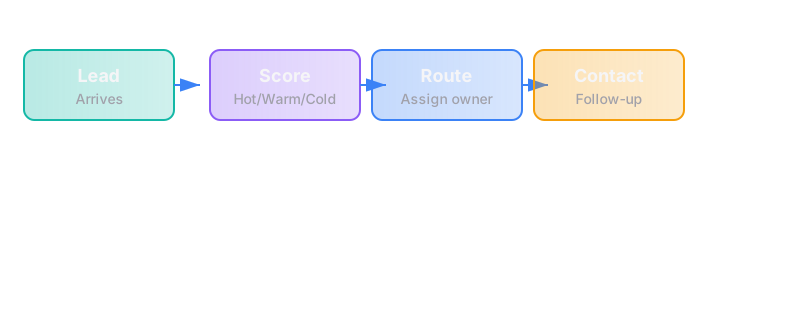
The trigger
A visitor submits a form on the website (contact form, assessment submission, newsletter signup).
The steps
Step 1: Capture
- Form submission arrives via webhook or API
- Data includes: name, email, company, firm size, industry, message
- System creates or updates a contact record in the CRM
Tools: Web form (custom or Typeform), CRM (HubSpot, Pipedrive, or similar)
Failure mode: Form submission fails silently, or data doesn't reach the CRM
Fix: Webhook monitoring with alert on failure; daily check of "unprocessed submissions" list
Step 2: Score
- System evaluates the lead against qualification criteria
- Criteria might include: firm size, budget indicator, timeline urgency, fit with services
- Lead receives a score or tier (e.g., "Hot," "Warm," "Cold" or numeric score)
Tools: Automation platform (n8n, Make, Zapier), CRM scoring rules
Failure mode: Scoring logic is wrong, or leads are misclassified
Fix: Regular audit of scored leads vs. actual outcomes; adjust thresholds based on conversion data
Step 3: Route
- Based on score and type, lead is assigned to the right person or queue
- Hot leads → immediate notification to sales owner
- Warm leads → added to nurture sequence
- Cold leads → added to long-term nurture or declined
Tools: CRM assignment rules, email notifications, Slack integrations
Failure mode: Leads sit unassigned, or wrong person gets notified
Fix: Default owner assignment; daily "unassigned leads" report; escalation after 24 hours
Step 4: Follow-up
- Automated or semi-automated response sent within a defined timeframe
- Hot leads: Personal email within 24 hours
- Warm leads: Nurture sequence starts immediately
- Cold leads: Monthly newsletter or no contact
Tools: Email automation, CRM tasks, calendar integration
Failure mode: Follow-up is delayed or inconsistent
Fix: SLA tracking (e.g., "all hot leads contacted within 24 hours"); alerts on breaches
The failure modes
| Failure | Impact | Detection | Prevention |
|---|---|---|---|
| Form submission fails | Lost leads | Webhook error logs; daily "missing submissions" check | Redundant submission path; email fallback |
| Scoring logic wrong | Misrouted leads | Weekly review of lead outcomes | A/B test scoring rules; adjust based on conversion |
| Lead sits unassigned | Delayed follow-up | Daily "unassigned leads" report | Default owner; auto-assign on creation |
| Follow-up delayed | Lost opportunity | SLA dashboard; alerts on breach | Automated reminders; escalation after threshold |
| Duplicate contacts | Confusion in CRM | Duplicate detection reports | Pre-creation check by email; merge workflow |
Rough build cost
| Component | Cost Range | Notes |
|---|---|---|
| Form + webhook setup | $500-$1,000 | Custom form or Typeform integration |
| Scoring logic | $1,000-$2,000 | Rules engine or custom scoring algorithm |
| Routing + notifications | $500-$1,000 | CRM configuration + email/Slack setup |
| Follow-up automation | $500-$1,500 | Email sequences + task creation |
| Testing + handover | $500-$1,000 | QA + documentation + training |
| Total | $3,000-$6,500 | Depends on complexity and CRM |
These are typical market costs to build this reference design. If your version fits our scope bound (at most 3 systems, 10 steps, 1 trigger), our fixed price is $4,500 for a First Workflow Build.
Timeline: 3-4 weeks from scope sign-off to live system (our fixed-price build commits to 5 weeks from a signed spec, including testing and handover)
Rough ongoing cost (by hand)
If done manually:
| Task | Time per Week | Cost at $100/hr |
|---|---|---|
| Review new leads | 2 hours | $200 |
| Score and categorize | 3 hours | $300 |
| Assign and notify | 1 hour | $100 |
| Send follow-ups | 5 hours | $500 |
| Total | 11 hours/week | ~$1,100/month |
Hidden cost: Inconsistency, delays, lost leads due to human error
What this excludes
- Custom form design — This assumes a basic form exists; redesign is separate
- Advanced lead scoring — Machine learning models or complex attribution are out of scope
- Multi-channel capture — This covers web forms only; phone, email, and social are separate workflows
- CRM migration — If you're switching CRMs, that's a different engagement
Why this matters
Leads that wait too long for a reply, or get an inconsistent one, go cold. A systematic approach:
- Ensures every lead gets a response
- Prioritizes the right leads for immediate attention
- Captures data for later analysis
- Frees up human time for actual conversations instead of data entry
How we'd approach building this
- Audit current process — Where do leads come from? What happens now? Where do they fall through?
- Define scoring criteria — What makes a lead "hot" vs. "cold"? This is a business decision, not a technical one.
- Map the routing rules — Who gets which leads? What's the escalation path?
- Build in stages — Start with capture + routing. Add scoring. Then add follow-up automation.
- Test with real data — Run parallel to existing process for 2 weeks; compare outcomes.
- Handover — Train the owner; document the failure modes; set up monitoring.
The runbook
Owner: [Named person on client side]
Daily checks:
- Unprocessed submissions list
- Unassigned leads report
- SLA breach alerts
Weekly checks:
- Scoring accuracy review
- Follow-up response rates
- Lead conversion by source
Monthly checks:
- Overall lead volume trends
- Score distribution changes
- Automation error logs
When things break:
- Check webhook logs
- Verify CRM connection
- Review recent rule changes
- Escalate to [support contact]
Questions this raises (for the client)
- What are your actual qualification criteria? (Not what you think they should be — what you use now.)
- Who owns each lead type? Is that person available when the lead arrives?
- What's your current follow-up SLA? Is it being met?
- What happens to leads that don't convert immediately?
- How do you measure the quality of a lead, not just the quantity?
Related teardowns
- New Client Intake — What happens after a lead converts
- Proposal First Drafts — How to automate the next step in the sales process
- Assessment Funnel — How the free assessment routes to the right engagement
See where you stand
This teardown is one piece of our method. The assessment will tell you whether you're ready to build, or what's missing first.
Take the free assessment