Reference design — not client work
New Client Intake
How to convert a signed engagement into an operational project — with the failure modes, build cost, and what it costs to keep doing by hand.
Workflow Overview
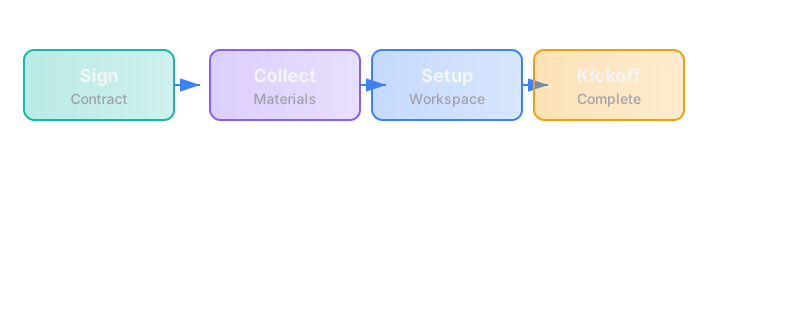
The trigger
A client signs the engagement agreement (or pays the deposit, depending on your process).
The steps
Step 1: Confirm Engagement
- Signed contract or payment confirmation arrives
- System creates a new project record with basic details:
- Client name, primary contact, email
- Engagement type (AI Opportunity Audit or First Workflow Build)
- Start date (immediate or scheduled)
- Scope summary (from the build spec or audit shortlist)
Tools: CRM (HubSpot, Pipedrive), project management tool (Notion, ClickUp, or similar), payment processor (Stripe)
Failure mode: Engagement is signed but no project is created, or key details are lost in translation
Fix: Automated project creation on contract signature/payment; checklist of required fields that blocks project start if incomplete
Step 2: Collect Pre-Work
- System sends a structured intake form to the client
- Form requests:
- Access credentials (CRM, email, relevant systems)
- Existing documentation (process docs, org charts, workflow diagrams)
- Stakeholder list (who needs to be involved, who owns the workflow after handover)
- Timeline constraints (hard deadlines, blackout periods)
- Success criteria (what "working" means in testable terms)
- Client submits; system validates completeness
Tools: Form tool (Typeform, Tally, custom), secure file upload (Dropbox, Google Drive, WeTransfer)
Failure mode: Client doesn't respond, provides incomplete information, or shares credentials insecurely
Fix: Automated reminders at 3 days and 7 days; explicit instructions on secure credential sharing; project cannot start until minimum information is received
Step 3: Set Up Project Infrastructure
- Create project workspace with:
- Project charter (scope, timeline, owner, success criteria)
- Communication channel (Slack channel, email thread, or project tool updates)
- Document repository (spec, runbook, meeting notes)
- Task tracker (build steps, milestones, dependencies)
- Invite relevant stakeholders (client owner, internal team)
- Schedule kickoff meeting and send calendar invites with agenda
Tools: Project management tool, communication platform, calendar system, document storage
Failure mode: Workspace is created but incomplete; stakeholders aren't invited; kickoff is scheduled without agenda
Fix: Standard project template that must be cloned; checklist that blocks kickoff until all elements are in place
Step 4: Conduct Kickoff
- 45-60 minute meeting covering:
- Review of scope and success criteria
- Introduction of team members and roles
- Communication protocols (how often, what channel, what to expect)
- Timeline and milestone review
- Q&A to surface assumptions or concerns
- Meeting notes captured and shared within 24 hours
- Action items assigned with deadlines
Tools: Video conferencing (Zoom, Google Meet), note-taking tool, calendar
Failure mode: Kickoff is unfocused, scope is unclear, or client leaves confused about next steps
Fix: Standard kickoff agenda; mandatory scope review; follow-up summary sent within 24 hours with explicit confirmation request
Step 5: Begin Build (for First Workflow Build engagements)
- Build team reviews intake package
- Technical scoping begins (if not already done in the audit phase)
- First build milestone is scheduled
- Client receives weekly status updates automatically
Tools: Development environment, automation platform (n8n), version control
Failure mode: Build starts before scope is fully understood; scope creep begins immediately
Fix: Explicit sign-off on detailed build spec before any configuration work begins; change request process documented and agreed
The failure modes
| Failure | Impact | Detection | Prevention |
|---|---|---|---|
| Engagement signed but not recorded | Work starts without contract or payment | Weekly "unrecorded engagements" check | Automated project creation on signature/payment |
| Incomplete intake information | Build starts with missing context | Pre-kickoff checklist review | Intake form with required fields; project blocked until complete |
| Wrong stakeholders invited | Key decisions are delayed or missed | Post-kickoff feedback | Stakeholder mapping exercise before kickoff |
| Kickoff without clear scope | Scope creep begins immediately | Scope review in first build milestone | Mandatory scope sign-off before build begins |
| No follow-up after kickoff | Client is confused about next steps | Client feedback; missed action items | Automated follow-up template sent within 24 hours |
| Credentials shared insecurely | Security risk | Audit of credential storage | Explicit instructions on secure sharing; password manager requirement |
Rough build cost
| Component | Cost Range | Notes |
|---|---|---|
| Intake form setup | $300-$800 | Form design + automation + validation |
| Project automation | $800-$2,000 | Auto-creation of project records, reminders, notifications |
| Kickoff workflow | $500-$1,000 | Calendar integration, agenda templates, follow-up automation |
| Document templates | $300-$700 | Project charter, status update templates, runbook structure |
| Testing + handover | $300-$800 | QA + documentation |
| Total | $2,200-$5,300 | Depends on complexity and tools |
These are typical market costs to build this reference design. If your version fits our scope bound (at most 3 systems, 10 steps, 1 trigger), our fixed price is $4,500 for a First Workflow Build.
Timeline: 2-3 weeks from scope sign-off to live system (our fixed-price build commits to 5 weeks from a signed spec, including testing and handover)
Rough ongoing cost (by hand)
If done manually:
| Task | Time per Engagement | Cost at $100/hr |
|---|---|---|
| Create project record | 30 minutes | $50 |
| Send and chase intake form | 1-2 hours | $100-$200 |
| Set up project workspace | 1 hour | $100 |
| Schedule and conduct kickoff | 2 hours | $200 |
| Follow-up and documentation | 30 minutes | $50 |
| Total | 4-5 hours/engagement | ~$500-$600/engagement |
Hidden cost: Inconsistency, missed steps, client confusion, delayed starts
What this excludes
- Contract drafting — This assumes a contract template exists; legal review is separate
- Payment processing setup — Stripe/PayPal configuration is a different workflow
- Deep technical scoping — Detailed technical requirements gathering is part of the build, not the intake
- Client onboarding beyond project start — Training and handover at the end of the build are separate workflows
Why this matters
A sloppy intake process creates problems that persist through the entire engagement:
- Scope creep — If the scope isn't crystal clear at the start, it will drift
- Delayed starts — Missing information means the build can't begin
- Client frustration — Confusion about next steps erodes confidence immediately
- Team inefficiency — Working with incomplete context wastes build time
How we'd approach building this
- Map the current intake process — What happens now from signature to kickoff? Where do things fall through?
- Define the minimum information needed — What must you have before you can start work?
- Design the intake form — What questions will get you that information?
- Build the automation — Contract signed → project created → form sent → reminders → kickoff scheduled
- Create the templates — Project charter, kickoff agenda, follow-up summary, status update format
- Test with a real engagement — Run the new process on the next engagement; compare to previous ones
- Handover — Document the process; train whoever owns it
The runbook
Owner: [Named person on internal team]
Daily checks:
- New engagements since last check
- Intake forms submitted but incomplete
- Kickoffs scheduled for the week
Weekly checks:
- All active projects have complete intake packages
- Follow-ups sent within 24 hours of kickoff
- Action items from kickoffs are tracked
When things break:
- Check which step failed (contract received? form sent? kickoff scheduled?)
- Manually complete the missing step
- Investigate why automation failed
- Escalate to [support contact] if not resolved within 24 hours
Questions this raises (for the client)
- What information do you actually need from a client before you can start work? (Not what would be nice — what's mandatory.)
- Who on your side owns the intake process? Is that person available when a client signs?
- What's your current time-from-signature-to-kickoff? Is it consistent?
- What happens if a client doesn't complete the intake form? Do you chase them? How?
- How do you ensure the scope agreed in the audit is the scope understood in the build?
Related teardowns
- Inbound Lead Qualification — What happens before a client signs
- Proposal First Drafts — How proposals are generated before the engagement
- First Workflow Build — What happens after intake is complete
- Assessment Funnel — How the free assessment routes to the right engagement
See where you stand
This teardown is one piece of our method. The assessment will tell you whether you're ready to build, or what's missing first.
Take the free assessment