Reference design — not client work
Proposal First Drafts
How to generate the first draft of a proposal from structured input, reducing draft time from hours to minutes while maintaining consistency.
Workflow Overview
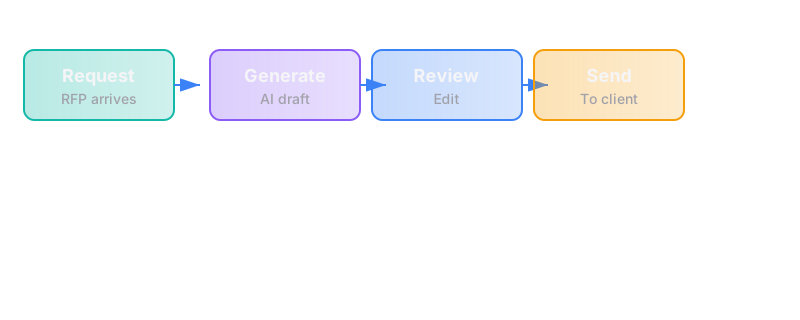
The trigger
A proposal is needed — either from an AI Opportunity Audit deliverable, a direct client request, or a sales opportunity that requires formal documentation.
The steps
Step 1: Gather Input Data
- System receives structured input:
- Client name, contact details, company information
- Problem statement (from assessment, audit, or discovery call notes)
- Proposed scope (workflow description, systems involved, steps)
- Pricing tier and engagement type
- Timeline (start date, duration, key milestones)
- Any special terms or conditions
Tools: CRM (stores client data and opportunity details), form or structured input (Typeform, Airtable, or custom), document generation system
Failure mode: Input is incomplete, inconsistent, or copied from a previous proposal without updating
Fix: Required fields validation; template that forces fresh input for each proposal; review step before generation
Step 2: Select Template
- System selects the appropriate proposal template based on:
- Engagement type (AI Opportunity Audit vs. First Workflow Build)
- Industry or vertical (if applicable)
- Special requirements (regulatory, technical complexity)
- Template includes:
- Standard sections (problem, approach, scope, timeline, pricing, terms)
- Placeholders for variable content
- Consistent formatting and branding
Tools: Document template system (Google Docs templates, Word templates, or dedicated proposal tool like PandaDoc)
Failure mode: Wrong template selected; outdated pricing or terms in template
Fix: Template versioning with clear dates; central template repository; regular review cycle
Step 3: Generate First Draft
- System populates the template with input data:
- Client information inserted into appropriate fields
- Problem statement reformatted into proposal language
- Scope detailed with standard language + custom elements
- Pricing calculated and formatted
- Timeline presented with milestones
- Document is saved with a consistent naming convention
- Draft is sent to proposal owner for review
Tools: Document automation (Documint, Pandadoc, or custom script using python-docx / Google Docs API)
Failure mode: Variables don't populate correctly; formatting breaks; document is unreadable
Fix: Template testing with sample data; validation step before sending to owner; fallback to manual edit
Step 4: Review and Edit
- Proposal owner reviews the draft:
- Check that problem statement accurately reflects client needs
- Verify scope is complete and accurate
- Confirm pricing is correct
- Add any custom language or special terms
- Ensure tone and style are appropriate
- Edits are made directly in the document
- Version is saved as "ready for client"
Tools: Document editor (Google Docs, Word), version control
Failure mode: Proposal contains errors, outdated information, or inappropriate language
Fix: Standard review checklist; second pair of eyes for high-value proposals; final validation before sending
Step 5: Send to Client
- Proposal is exported to PDF (or sent directly from proposal platform)
- Email is drafted with:
- Personalized greeting
- Brief summary of what's included
- Clear call to action (sign, schedule call, ask questions)
- Deadline or validity period (if applicable)
- Proposal is sent and tracked
Tools: Email client, proposal tracking (if using PandaDoc or similar)
Failure mode: Wrong version sent; proposal sent to wrong person; tracking fails
Fix: Pre-send checklist; confirmation of recipient; tracking verification
Step 6: Track Response
- System tracks:
- When proposal was sent
- When it was opened (if tracking enabled)
- Response deadline
- Client questions or feedback
- Automated reminders are sent before deadline
- Outcome is recorded (signed, rejected, negotiated)
Tools: CRM, proposal tracking, calendar
Failure mode: Proposal is forgotten; no follow-up; outcome not recorded
Fix: Automated reminder at 3 days before deadline; CRM update required to close opportunity
The failure modes
| Failure | Impact | Detection | Prevention |
|---|---|---|---|
| Incomplete input data | Proposal contains gaps or errors | Pre-generation validation | Required fields; validation rules |
| Wrong template selected | Proposal doesn't match engagement type | Review step | Template selection rules; manual confirmation |
| Outdated pricing in template | Client receives incorrect pricing | Regular template review | Central pricing source; template update workflow |
| Formatting breaks | Document is unprofessional or unreadable | Pre-send review | Template testing; preview before generation |
| Wrong version sent | Client sees draft or outdated proposal | Pre-send checklist | Version control; confirmation step |
| No follow-up | Proposal is forgotten; opportunity lost | CRM tracking; automated reminders | Deadline tracking; reminder automation |
| Outcome not recorded | No learning from wins/losses | CRM audit | Required field to close opportunity |
Rough build cost
| Component | Cost Range | Notes |
|---|---|---|
| Template design | $500-$1,500 | Professional proposal templates for each engagement type |
| Document automation | $1,000-$3,000 | Integration between CRM, input system, and document generator |
| Email automation | $300-$800 | Personalized email templates + sending automation |
| Tracking + reminders | $500-$1,200 | CRM integration; deadline tracking; automated follow-up |
| Testing + handover | $400-$1,000 | QA + documentation + training |
| Total | $2,700-$7,500 | Depends on complexity and tools |
These are typical market costs to build this reference design. If your version fits our scope bound (at most 3 systems, 10 steps, 1 trigger), our fixed price is $4,500 for a First Workflow Build.
Timeline: 3-4 weeks from scope sign-off to live system (our fixed-price build commits to 5 weeks from a signed spec, including testing and handover)
Rough ongoing cost (by hand)
If done manually:
| Task | Time per Proposal | Cost at $100/hr |
|---|---|---|
| Gather input data | 30-60 minutes | $50-$100 |
| Select and open template | 5-10 minutes | $8-$17 |
| Populate and format | 1-2 hours | $100-$200 |
| Review and edit | 30-60 minutes | $50-$100 |
| Send and track | 15-30 minutes | $25-$50 |
| Follow-up | 15-30 minutes | $25-$50 |
| Total | 3-4.5 hours/proposal | ~$260-$520/proposal |
Hidden cost: Inconsistency between proposals, errors, missed follow-ups, lost opportunities
What this excludes
- Legal review — Contract terms and legal language are separate from proposal generation
- Pricing strategy — How prices are determined is a business decision, not part of the automation
- Client discovery — Gathering the initial requirements is a separate workflow (assessment or audit)
- Negotiation — Handling counteroffers and revisions is a different process
Why this matters
Proposals are a critical touchpoint in the sales process. A sloppy proposal:
- Erodes confidence — Errors or inconsistencies suggest sloppy work ahead
- Delays decisions — Unclear proposals require clarification, extending the sales cycle
- Creates inconsistency — Different proposals look different, making your offer seem variable
- Wastes time — Manual drafting takes hours that could be spent on actual work
How we'd approach building this
- Audit current proposal process — How are proposals created now? What takes the most time? Where do errors occur?
- Standardize the templates — Create consistent templates for each engagement type with all standard language
- Identify variable data — What changes from proposal to proposal? Where does it come from?
- Design the automation — Map the flow from input → template → generation → review → send → track
- Build and test — Create the automation; test with sample data; validate output
- Train and handover — Document the process; train whoever owns proposals
- Iterate — Track proposal conversion rates; refine templates and process based on results
The runbook
Owner: [Named person on internal team]
Daily checks:
- Proposals sent in the last 48 hours (confirm receipt)
- Proposals due for follow-up
- New proposal requests
Weekly checks:
- Proposal conversion rate
- Average time from send to decision
- Common questions or objections
When things break:
- Check if the issue is with input data, template, or generation
- Manually create the proposal if automation fails
- Investigate and fix the root cause
- Escalate to [support contact] if not resolved within 24 hours
Questions this raises (for the client)
- What information do you absolutely need before you can write a proposal? What can you infer or assume?
- How long does it currently take to write a proposal? What parts take the most time?
- What's your proposal conversion rate? Do you track why proposals are rejected?
- Who reviews proposals before they're sent? Is that person consistently available?
- What happens to proposals after they're sent? How do you track responses and outcomes?
Related teardowns
- Inbound Lead Qualification — What happens before a proposal is needed
- New Client Intake — What happens after a proposal is accepted
- Assessment Funnel — How the free assessment identifies proposal-worthy opportunities
- Workflow Build — What the proposal promises to deliver
See where you stand
This teardown is one piece of our method. The assessment will tell you whether you're ready to build, or what's missing first.
Take the free assessment