Reference design — not client work
Weekly Status Reporting
How to automatically generate and send consistent weekly status updates to clients, keeping them informed without requiring manual compilation.
Workflow Overview
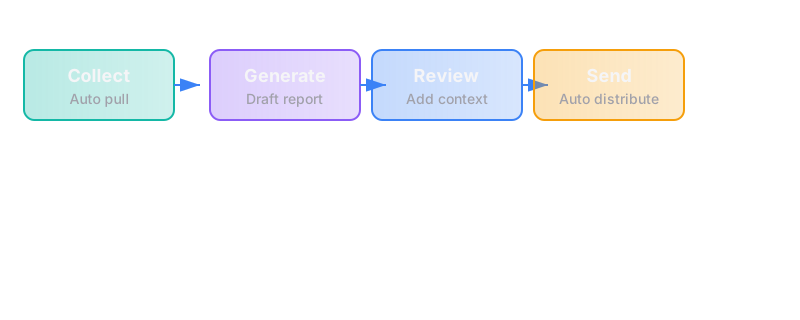
The trigger
A scheduled day and time each week (e.g., every Friday at 4pm) during an active engagement.
The steps
Step 1: Gather Status Data
- System collects data from multiple sources:
- Tasks completed this week (from project management tool)
- Tasks in progress with current status
- Blockers or risks identified
- Upcoming tasks for next week
- Time spent vs. budget (if applicable)
- Milestone progress (percentage complete)
- Data is normalized into a standard format
Tools: Project management tool (Notion, ClickUp, Asana), time tracking (if used), CRM or engagement tracking system
Failure mode: Data is incomplete, inconsistent, or requires manual compilation
Fix: Standard task structure; required fields; automated data collection from source systems
Step 2: Generate Status Summary
- System creates a structured summary:
- This week's highlights — 3-5 bullet points of completed work
- Current focus — What the team is working on now
- Blockers/risks — Any issues that need client attention
- Next week's plan — What's scheduled
- Overall progress — Where the engagement stands (percentage, milestones)
- Time/budget status — If applicable (hours used vs. remaining)
- Template is selected based on engagement type and client preference
Tools: Document generation, automation platform, template system
Failure mode: Summary is too technical, too vague, or misses important context
Fix: Standard language templates; review step before sending; client feedback loop
Step 3: Add Human Context (Optional but Recommended)
- Project owner adds brief commentary:
- Context for any blockers or risks
- Explanation of technical decisions
- Acknowledgment of client input or feedback
- Personal touch (keeps it from feeling fully automated)
- This step should take 5-10 minutes maximum
Tools: Email client, document editor
Failure mode: No human context is added; report feels robotic or impersonal
Fix: Make this a required step in the process; keep it brief but genuine
Step 4: Send to Stakeholders
- Status report is sent to:
- Primary client contact (owner of the workflow)
- Any secondary stakeholders (as specified in engagement)
- Internal team (for record-keeping)
- Email includes:
- Clear subject line with engagement name and week
- Brief intro ("Here's this week's status...")
- The status report (inline or attached as PDF)
- Clear call to action if anything needs client attention
- Delivery is tracked (opened? responded to?)
Tools: Email system, document sharing
Failure mode: Report is sent to wrong people; important stakeholders are missed; report is unclear
Fix: Stakeholder list from engagement setup; pre-send checklist; standard format
Step 5: Track Responses and Action Items
- System tracks:
- Whether the report was opened
- Any client responses or questions
- Action items identified in the report
- Follow-up required
- Action items are logged in the project management tool
- Follow-up tasks are scheduled as needed
Tools: Email tracking, project management tool, CRM
Failure mode: Client questions are missed; action items are not tracked; follow-up doesn't happen
Fix: Dedicated inbox or label for status report responses; mandatory action item logging; follow-up reminders
Step 6: Archive and Report on Trends
- Status reports are archived in a consistent location
- Periodic review (monthly or at engagement end):
- How many reports were sent?
- What were the common blockers?
- How accurate were the estimates vs. actuals?
- What could be improved in the process?
- Insights are used to improve future engagements
Tools: Document storage, analytics (optional)
Failure mode: Reports are lost or disorganized; no learning from patterns
Fix: Standard archive location; quarterly review of engagement patterns
The failure modes
| Failure | Impact | Detection | Prevention |
|---|---|---|---|
| Data is incomplete | Report is inaccurate or misleading | Pre-send review | Required fields; data validation |
| Report is too technical | Client doesn't understand what's happening | Client feedback | Standard non-technical language; client preference on detail level |
| No human context | Report feels impersonal; trust erodes | Client feedback | Make human commentary a required step |
| Sent to wrong people | Important stakeholders are uninformed | Client feedback | Stakeholder list from engagement setup |
| Client questions are missed | Issues escalate unnecessarily | Response tracking | Dedicated inbox/label; daily check |
| Action items are not tracked | Same issues repeat | Engagement review | Mandatory action item logging |
| Reports are inconsistent | Client can't track progress over time | Client feedback | Standard template; consistent format |
Rough build cost
| Component | Cost Range | Notes |
|---|---|---|
| Data integration | $800-$2,000 | Connect project management, time tracking, and CRM |
| Report generation | $1,000-$2,500 | Template system; automated summary creation |
| Email automation | $400-$1,000 | Scheduled sending; stakeholder management |
| Response tracking | $400-$1,000 | Email tracking; action item logging |
| Dashboard + reporting | $500-$1,500 | Engagement health metrics; trend analysis |
| Testing + handover | $400-$1,000 | QA + documentation + training |
| Total | $3,500-$9,000 | Depends on complexity and tools |
These are typical market costs to build this reference design. If your version fits our scope bound (at most 3 systems, 10 steps, 1 trigger), our fixed price is $4,500 for a First Workflow Build.
Timeline: 3-5 weeks from scope sign-off to live system (our fixed-price build commits to 5 weeks from a signed spec, including testing and handover)
Rough ongoing cost (by hand)
If done manually:
| Task | Time per Week | Cost at $100/hr |
|---|---|---|
| Gather status from team | 30-60 minutes | $50-$100 |
| Compile into report | 30-60 minutes | $50-$100 |
| Review and add context | 15-30 minutes | $25-$50 |
| Send and track | 15 minutes | $15-$25 |
| Log action items | 15 minutes | $15-$25 |
| Total | 1.5-3 hours/week per engagement | ~$150-$300/week/engagement |
Hidden cost: Inconsistent reporting, missed questions, client anxiety, time wasted answering "what's happening" emails
What this excludes
- Project management itself — The actual work of managing the engagement is separate
- Client meetings — Weekly status reports complement, not replace, scheduled calls
- Escalation handling — Major issues that require immediate attention are a different workflow
- Final delivery — The handover and final report at engagement end is a separate process
Why this matters
Poor communication is the #1 source of client frustration in consulting engagements:
- Client anxiety — When clients don't know what's happening, they assume the worst
- Time waste — "What's the status?" emails and calls interrupt productive work
- Trust erosion — Inconsistent or unclear reporting suggests disorganization
- Scope creep — Without clear tracking, the scope can drift without either party noticing
How we'd approach building this
- Audit current status reporting — How is status communicated now? What format is used? What questions do clients ask repeatedly?
- Define the standard format — What sections are always included? What's the tone? Who receives it?
- Identify data sources — Where does the status information live? How can it be extracted?
- Build the automation — Connect data sources to report generation to email delivery
- Add human context step — Ensure a person reviews and adds commentary before sending
- Set up tracking — Log responses, action items, and follow-ups
- Test and iterate — Run for a few weeks; get client feedback; refine the format
The runbook
Owner: [Named person on internal team — typically the engagement owner]
Daily checks:
- Client responses to status reports
- Action items requiring follow-up
Weekly checks:
- Status reports sent on schedule
- Any blockers that need escalation
- Upcoming milestones or deadlines
Monthly checks:
- Engagement health (on track? budget status?)
- Client satisfaction (any concerns raised?)
- Process improvements (what's working? what's not?)
When things break:
- Check if the issue is data collection, report generation, or delivery
- Manually compile and send if automation fails
- Investigate and fix the root cause
- Escalate to [support contact] if systemic
Questions this raises (for the client)
- How do you currently communicate status to your clients? What format works best for them?
- What information do clients ask for most frequently? What questions keep coming up?
- Who on your team is responsible for status reports? Is that person consistent?
- How do you handle client concerns or questions that arise between scheduled meetings?
- What does "on track" look like for your engagements? How do you measure it?
Related teardowns
- New Client Intake — Setting up stakeholder lists and communication preferences
- Overdue Invoice Chasing — What happens when engagement terms aren't met
- Workflow Build — The actual work being reported on
See where you stand
This teardown is one piece of our method. The assessment will tell you whether you're ready to build, or what's missing first.
Take the free assessment